My Family Wouldn't Use Our Document Archive, So I Built Them a Telegram Bot
Earlier this year I set up Paperless-ngx in my homelab for our family documents. It is an excellent piece of software: scan or upload anything, OCR runs automatically, and every contract, invoice, and certificate becomes searchable and tagged. I was happy. My family was not.
Not out of stubbornness. For them the archive was one more web application with one more login to learn, and its search could not answer the questions they actually had — “when does the apartment insurance expire?”, “how much did we spend on utilities this year?” Keyword search returns documents; my family wanted answers.
So I built them a different interface: a Telegram bot backed by an LLM agent that talks to the archive on each user’s behalf. The first working version took about two evenings, assembled from ready-made parts. Turning it into an open-source project other people could trust took far longer than the bot itself — and that gap turned out to be the most instructive part. This post is the story of both.
The problem wasn’t the software
Paperless-ngx is built for the person who runs it. The web UI is an archivist’s tool — filters, tags, document types, saved views — and for me, the archivist, it is exactly right. My family had no reason to learn any of it: they never file documents, they only ever need something from the archive, and rarely more than once a month.
Search was the deeper issue. Paperless-ngx has solid full-text search, and the community mobile apps wrap it in perfectly fine interfaces. But keyword search answers one kind of question: which documents contain this word. Family questions are not shaped like that:
- “Is the boiler still under warranty?”
- “What is the notice period in our rental agreement?”
- “Which of us signed the internet contract?”
The mismatch is not a flaw in Paperless; it is what search is. But it meant no amount of UI polish was going to help, because the missing piece was not a better search box. It was something that could read the documents and reply.
Meet the users where they already are
Two observations dissolved the problem.
The first: every member of my family already has Telegram open. All day, every day. It is how we talk. An interface that lives there needs no onboarding: nothing to install, nothing to explain.
The second observation was that the missing translation layer between human questions and a REST API finally exists. An LLM agent with tool access can take “how much did we spend on utilities?”, decide it needs to search the archive, read the matching invoices, and add up the numbers. Five years ago the chatbot version of this idea would have been a brittle keyword parser wearing a trench coat. Today it is the boring, obvious architecture.
Two evenings, three off-the-shelf parts
I wrote very little original code. The bot is mostly plumbing between three components that already existed:
- pyTelegramBotAPI — the Telegram side: handlers, file uploads, inline buttons.
- The Gemini API, driven through the Google Antigravity SDK — the agent loop. I had been experimenting with Antigravity already, and its agent-with-MCP-tools model fit this exactly.
- @baruchiro/paperless-mcp — a community MCP server that exposes the Paperless-ngx REST API as tools the agent can call.
flowchart LR
    U[👤 Telegram chat] --> B[🧞 Bot<br>Python]
    B --> A[Gemini agent<br>Antigravity SDK]
    A -->|"MCP tools<br>(user's own Paperless token)"| M[paperless-mcp]
    M -->|REST API| P[(Paperless-ngx)]
The one design decision I would defend in front of a security review happened on evening one: the bot has no document-permission model of its own. A small mapping ties each Telegram user ID to that person’s own Paperless-ngx API token, and every agent run uses the requesting user’s token. Whatever Paperless lets that person see is exactly what the bot can see — and change — on their behalf, nothing more. Messages from unknown Telegram IDs are silently ignored. The bot also keeps no database; conversation history lives in memory (the last ten turns per user) and dies with the process.
That was the whole first version: ask questions in chat, upload a PDF or photo and have the agent wait out the OCR, then set the title, date, correspondent, and tags itself. Most of those two evenings went into prompt instructions rather than code.
What it feels like
The part I did not plan for: analytics came free. Because the agent reads the documents it finds, questions a search box cannot even parse come back with real answers, and thanks to the conversation memory, so do follow-ups. A typical exchange, with sample numbers:
Me: How much did we spend on utilities in 2025?
Bot: 💶 Utilities in 2025: €2,140 across 14 invoices — electricity €960, heating €780, water €400.
Me: And compared to 2024?
Bot: 📈 2024: €1,890 → 2025: €2,140. That’s +13%, mostly heating.
You can ask in your own language, and the answer comes back in the same one. Documents the bot finds arrive with download buttons for the original PDFs.
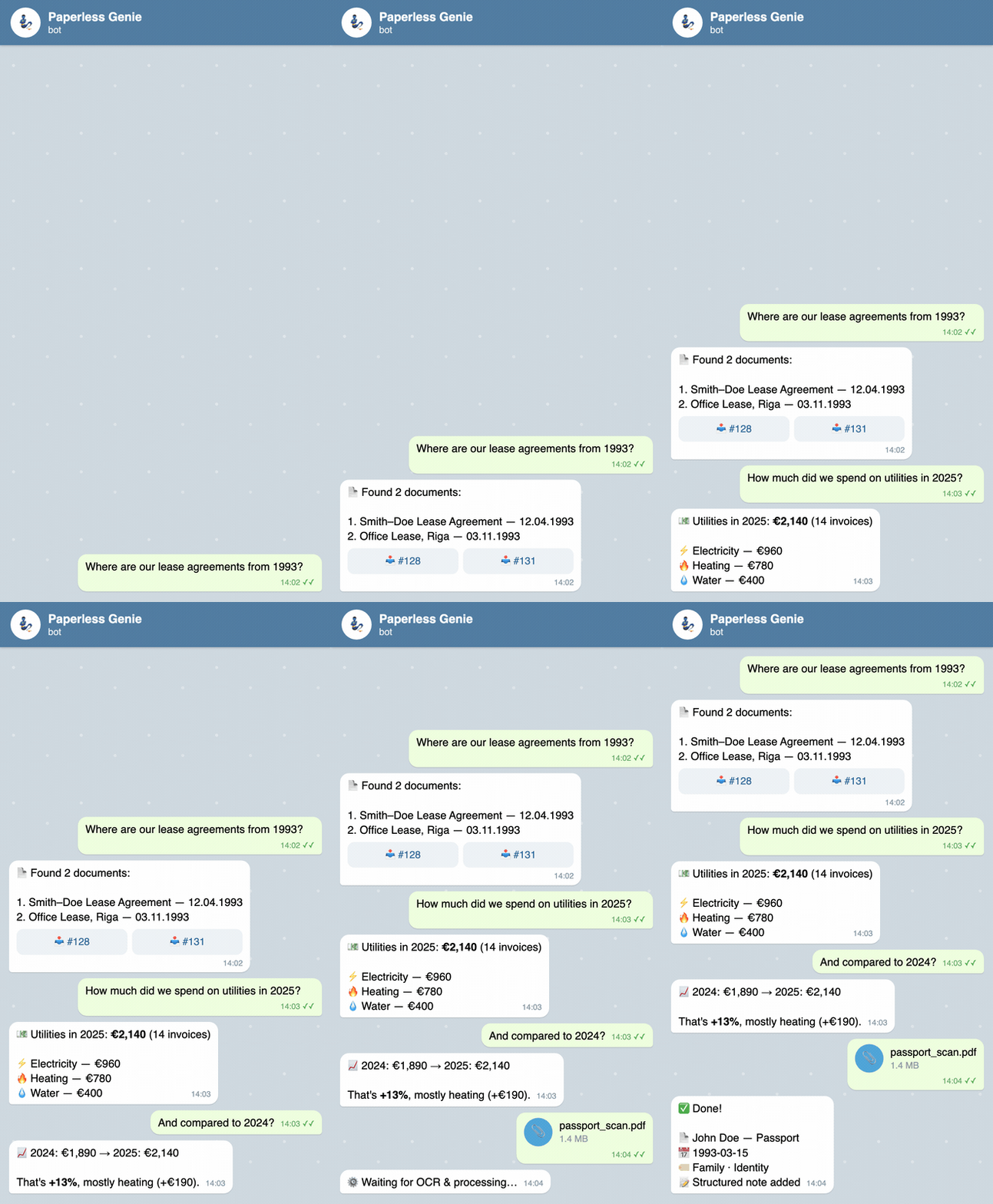 Illustrative demo — a mock-up chat with sample data, not a recording of a live instance.
The honest trade-offs
I shipped this to my own family first and to strangers second, so the limitations were never abstract to me.
Document text goes to Google. The agent runs on the Gemini API: retrieved document text and your queries are sent to Google’s servers. This is not a fully local setup. A free-tier AI Studio key works, but read the free tier’s data-use terms — a paid key comes with different ones.
For our family the extra exposure is close to zero, and it is worth being precise about why. Almost all of these documents arrive by email, and our mailboxes are Gmail: the bills and contracts already live on Google’s servers the moment they reach us. We also forward them to each other in our family chat, which, like any Telegram bot chat, is not end-to-end encrypted anyway. Letting a Google API read the same documents does not change where our data lives — only under what terms, which is exactly why the free-versus-paid key distinction above matters. If your documents do not flow through a Google mailbox, your math is different, and if that makes this a dealbreaker, this tool is not for you yet. Local model support is the obvious future direction if people want it.
The totals are an assistant’s summary, not accounting. The LLM computes them from the text of the documents it retrieved. Accuracy depends on OCR quality and the model. Treat the numbers as a smart summary and spot-check anything important against the originals — that is what the download buttons are for.
From “works for us” to something strangers can run
The two-evening version worked, but I would not have published it. Between the working hack and the public repository sat the unglamorous majority of the project: an environment allowlist so the MCP subprocess receives only the variables it needs, and never the Telegram bot token, the Gemini key, or other users’ credentials; a pinned MCP server version; a real test suite (coverage went from 7% to 65%); CI, static typing, secret scanning; a docs site; and the licensing homework (AGPL-3.0, plus a contributor agreement).
None of that changed what the bot does. All of it changed whether someone else could trust it. The hack is the cheap part — the trust wrapper is where the real cost lives, and I now budget for that whenever I estimate a “small” tool.
The reception confirmed the lesson from an unexpected angle. When I announced the bot to the Paperless-ngx community on Reddit, the warmest replies were not about the features. They were about the section that listed what the tool cannot do.
Takeaways
- The best interface is the one your users already have open. I could not get my family to adopt a web UI; I never had to ask them to adopt a chat.
- MCP turned integration into configuration. I did not write a Paperless client for the agent — I pointed it at an existing community MCP server. The agent-plus-tools pattern generalizes to anything with an API.
- Don’t build a permission model; borrow one. Per-user API tokens meant Paperless’s existing permissions decide who sees which documents — the bot adds no access rules of its own.
- Put the limitations in the announcement itself. Nothing in the launch post earned more goodwill than the paragraph about what the tool cannot do.
The project is open source under AGPL-3.0: github.com/rabestro/paperless-genie, with setup docs at jc.id.lv/paperless-genie. It is young, and there is a lot of room for improvement — ideas and issues are very welcome.
And if your family also refuses to open the archive’s UI: maybe don’t fight it. Move the archive to where they already are.